An uncomfortable truth: the tiny bit of JavaScript that runs on Marketo’s click tracking servers (i.e. branding domains) has 2 pretty embarrassing bugs, but the resulting logic — by accident — works just fine!
Here’s the code, which runs 10s of millions of times per day:
var redirecturl = 'https://www.example.com/landingpage?mkt_tok=NDEwLVhPUi02NzMAAA...';
document.getElementsByTagName('head')[0].addEventListener('load',redirect());
function redirect() {
  var anchor = window.location.hash;
  window.self.location = redirecturl + anchor;
}
If you suspend disbelief, this code seems to:
- add a
loadevent listener to the first<head>in the document - call the
redirectfunction when thatloadevent fires
But <head> elements don’t fire a load event
Except for a special few, like <img>, <script>, and <iframe>[1], elements don’t natively fire load. <head> isn’t one of the specials.
All elements are valid EventTargets — meaning you can call addEventListener(type,callback,options), passing any string for type, without an error. But the load event will not fire unless the element supports it.[2]
So it’s impossible for a callback to run when <head> loads.[3]
And the event listener isn’t even added!
To add an event listener to an element, the callback argument must either be a JS function or a JS object with a function property handleEvent. Any other value doesn’t match what the spec calls the “callback interface,” in which case the effective callback is null and there’s no event listener added:[4]
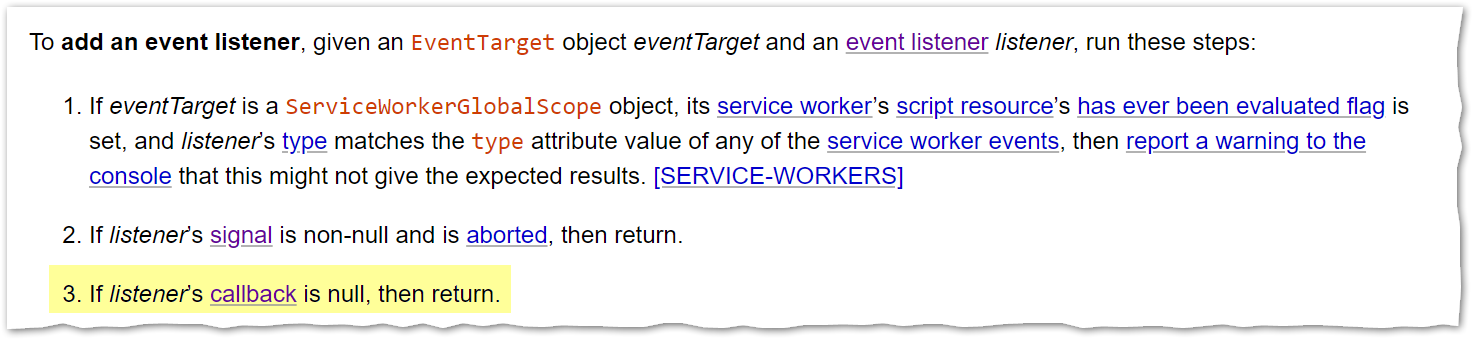
And guess what? The code isn’t adding a valid callback interface. It’s adding the return value of running redirect() which is undefined. Even if <head> did fire load, nothing gets added to the event listener stack in the first place.
So why does it still redirect correctly?
Remember, the 2nd arg is redirect(), not redirect. While the intent was to run redirect on some event (like the <head> being “ready,” which isn’t a thing), instead it runs immediately. Yet by luck, redirect() already has everything it needs, since redirecturl is set on line 1 and window.location.hash is always available.[5]
The executed code is therefore identical to:
var redirecturl = 'https://www.example.com/landingpage?mkt_tok=NDEwLVhPUi02NzMAAA...';
redirect();
function redirect() {
  var anchor = window.location.hash;
  window.self.location = redirecturl + anchor;
}
The current code is extremely fragile, not understood by its maintainers, and should be fixed. But for all that, it ❝works❞ — in giant quotes — so well that nobody noticed it was buggy across likely trillions of visits! Go figure.
Notes
[1] Not an exhaustive list, other load-ables include <style>, <link> and <object>.
[2] Yes, you can programmatically dispatch an untrusted event like document.head.dispatchEvent(new Event("load")). That’s not the same!
[3] Unclear what “load” would even mean, presumably something akin to connectedCallback().
[4] That’s why element.addEventListener("click", 999) or element.addEventListener("click", { bzzt: function(){} ) won’t throw ... is not a function errors on click. The listener isn’t added if not callback-compatible, so there’s no attempt to run it.
[5] And of course redirect itself is hoisted so it can be called before it’s lexically declared.