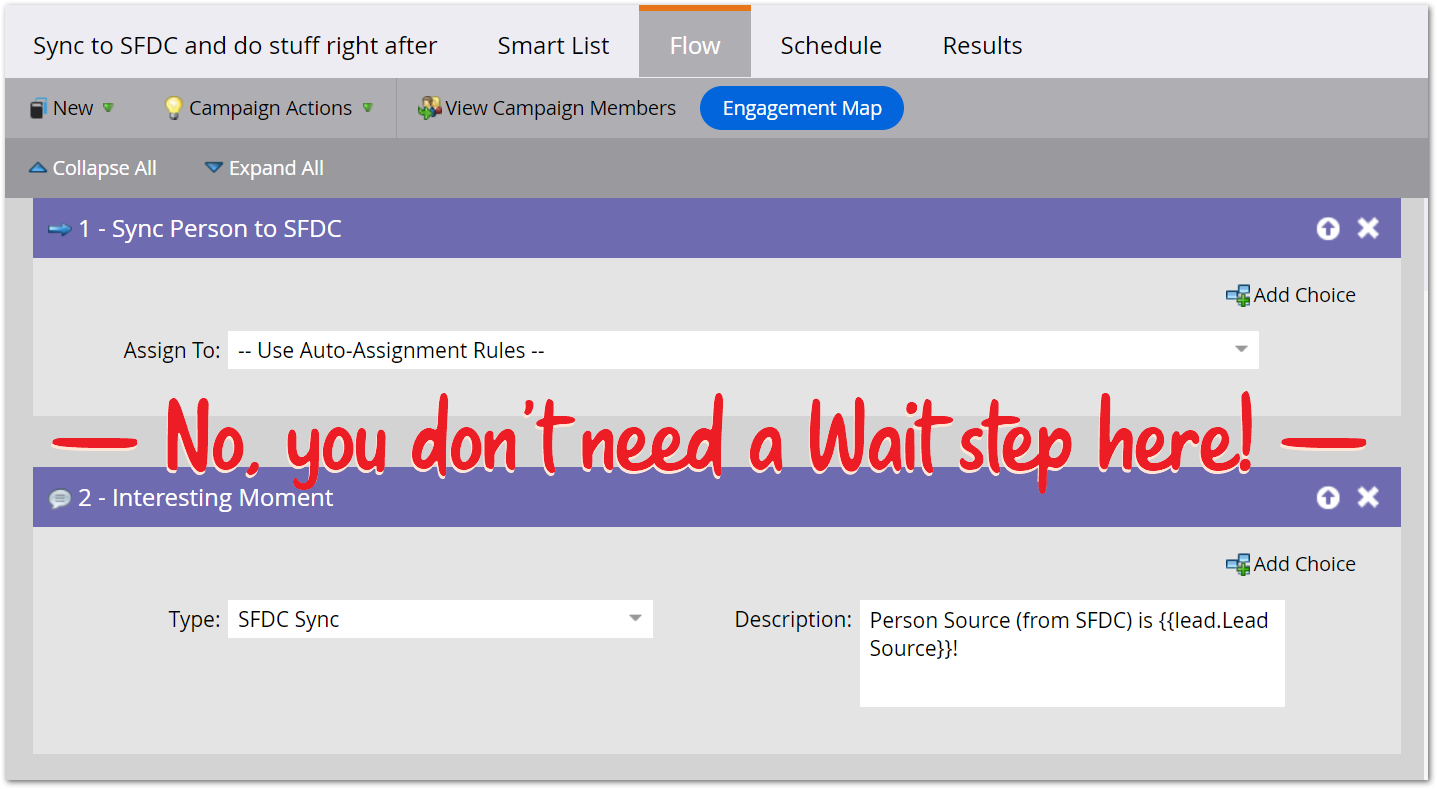
We talk a lot about race conditions in the Marketo community, and I love reminding folks certain operations aren’t guaranteed to complete in flow step order.[1] Unfortunately, users tend to overcorrect, forgetting Marketo does guarantee order in many cases, just not all sensitive cases!
This came up on a recent Nation thread where someone’s new lead flow included Sync Person to SFDC, followed by a 5-minute Wait, then Send Email. “Exactly what is the Wait step for?” I asked.
Unfortunately, the OP ghosted the thread, but others guessed “To make sure the sync has actually happened.” They were thinking the email, which included a booking link, shouldn't go out until the lead is visible to sales.
But that’s wrong on 2 counts:
- First, a Wait step is unnecessary because Sync Person is guaranteed to finish before the next step runs. If the sync succeeds, field updates triggered on the SFDC side will be synced to Marketo immediately. After the bidirectional sync, the API connection closes and it’s on to the next step.
- Second, even if a Wait were in there (again, totally unnecessary!) Sync Person merely finishing doesn’t mean the record was created in SFDC. Finishing includes both success and failure. A validation error from SFDC means the person is still Marketo-only.
A closer look at Sync Person success
Let’s run a real-world test. The flow runs Sync Person to SFDC and immediately logs an Interesting Moment — no Wait — and crucially, the IM description includes Lead Source, a field that’s only populated when Marketo gets the value from SFDC:
Here’s the corresponding activity log:
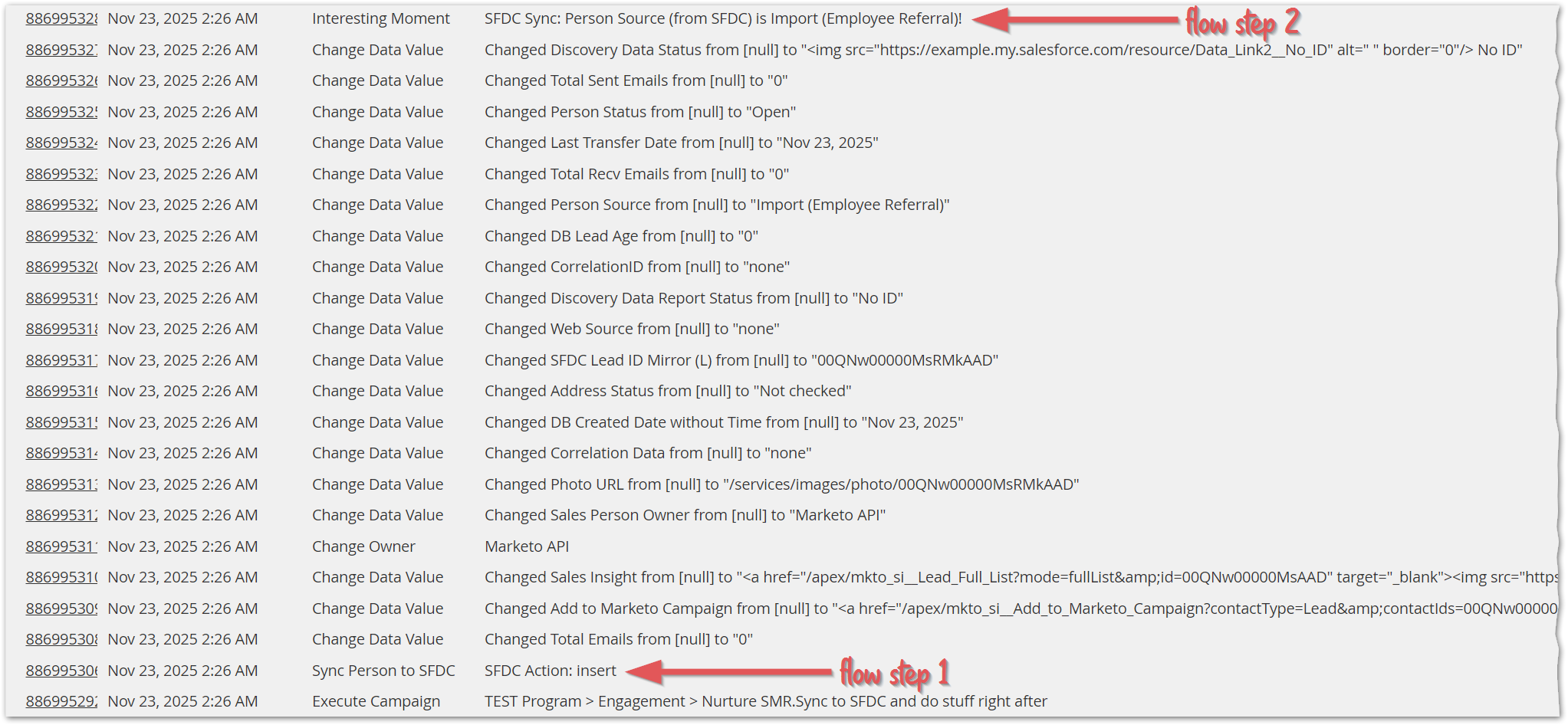
As you can see, Sync Person runs and is followed by a host of other data value changes fetched from SFDC. After all those updates comes the Interesting Moment, with Lead Source “Import (Employee Referral)” populated in the IM as desired.
You might wonder if the updates and IM are happening in parallel, since Marketo only shows minutes in the UI. Nope! The JSON response shows the last update at 02:26:17 and the IM at 02:26:18, one second later:
{
    "resultCode": "Succeeded",
    "actionName": "Interesting Moment",
    "detail": "SFDC Sync: Person Source (from SFDC) is Import (Employee Referral)!",
    "dateAndTime": "2025-11-23 02:26:18",
    "historyLogId": 886995328,
    "assetId": null,
    "detailJson": {
        "Choice Number": 0,
        "Description": "Person Source (from SFDC) is Import (Employee Referral)!",
        "Step ID": 130078,
        "Source": "Lead action",
        "operator": "is",
        "Date": "2025-11-23 01:26:18",
        "datatype": "string",
        "Lead ID": 33945529,
        "Type": "SFDC Sync"
    },
    "campaignId": 45378,
    "campaignName": "TEST Program > Engagement > Nurture SMR.Sync to SFDC and do stuff right after",
    "actionTypeId": 46,
    "actionAssetType": "mktInterestingMoment",
    "date": "2025-11-23 02:26:18",
},
{
    "resultCode": "Succeeded",
    "actionName": "Change Data Value",
    "detail": "Changed Discovery Data Status from [null] to \"<img src=\"https://example.my.salesforce.com/resource/Data_Link2__No_ID\" alt=\"\" border=\"0\"/> No ID\"",
    "dateAndTime": "2025-11-23 02:26:17",
    "historyLogId": 886995327,
    "assetId": 2826,
    "detailJson": {
        "Choice Number": 0,
        "Reason": "Synched from salesforce.com Lead ID 00QNw00000MsRMkAAD",
        "DB Object ID": 2,
        "Attribute Name": "Discovery Data Status",
        "Step ID": 130077,
        "New Value": "<img src=\"https://vaneck.my.salesforce.com/resource/Data_Link2__No_ID\" alt=\"\" border=\"0\"/> No ID",
        "Old Value": null,
        "Source": "sfdc",
        "Lead ID": 33945529,
        "Attribute ID": 2826,
        "isCustomerCreated": true
    },
    "campaignId": 45378,
    "campaignName": "TEST Program > Engagement > Nurture SMR.Sync to SFDC and do stuff right after",
    "actionTypeId": 13,
    "actionAssetType": "mktDbAttribute",
    "date": "2025-11-23 02:26:17",
}
Capturing Sync Person failure
Mentioned above that Sync Person completing, whether you Wait for it or not, doesn’t mean the record was successfully upserted into SFDC: it just means Marketo tried to upsert.
To proceed only if Sync Person was successful, use a (second) campaign triggering on Person is Synced to SFDC:
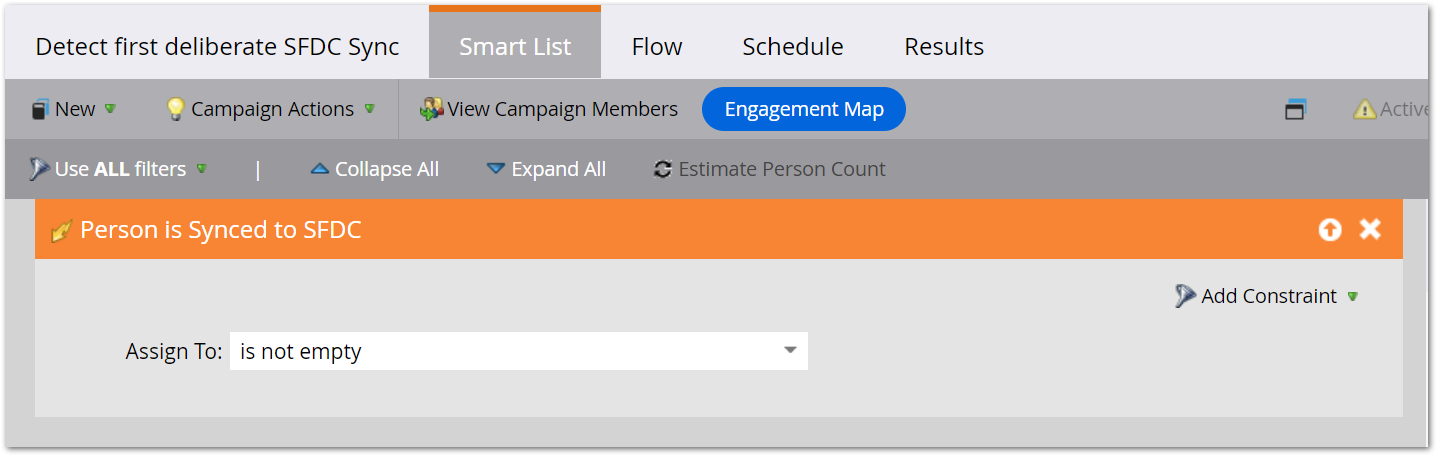
Marketo only fires this trigger if the person was actually synced.
So you never need a Wait, but depending on how worried you are about sync failures, you may need a more complex overall setup.
Notes
[1] Updates from Call Webhook response mappings, for example. That’s why you need the Webhook is Called trigger.