Smart Lists offer a dizzying array of filters (In Past, In Past Before, In Date Range, that stuff) for Date and DateTime fields. Yet you can’t natively check if the current system time — that is, the time a campaign is triggered — is within a certain time range on a certain day.
Even if you save {{system.DateTime}} to a field, native filters lack hour-of-day and day-of-week awareness. Obviously, you need both to determine if a form came in during business hours and should be promptly Alert-ed to sales vs. Wait-ed until next business day.[1]
Luckily, there’s a workaround for Fills Out Form triggers via a little JS.
Create a helper field
First, create a new String (not Date or DateTime) field Filterable Form Timestamp.
Add the JS
Then add this code to pages with time-sensitive forms:
MktoForms2.whenReady(function(readyForm){
   const minIncrement = 30; // easier filtering than every minute
   const ianaTimeZone = "America/New_York"; // working hours in this timezone

   readyForm.onSubmit(function(submittingForm){
      const now = new Date();
      const formatter = new Intl.DateTimeFormat("en-US", { hourCycle: "h23", hour: "numeric", minute: "numeric", weekday: "long", timeZone: ianaTimeZone });

      const partsMap = new URLSearchParams(formatter.formatToParts(now).map( ({ type,value }) => [type,value] ));
      const minuteClamped = Math.floor(partsMap.get("minute") / minIncrement) * minIncrement;

      const filterable = `${partsMap.get("hour")}:${minuteClamped.toString().padStart(2,"0")} ${partsMap.get("weekday")}`;

      submittingForm.addHiddenFields({
         filterableFormTimestamp: filterable
      });
   });
});
(Or just add it to all pages with forms if that’s easy in your environment.)
Now, Filterable Form Timestamp will have values formatted as <HH>:<mm> <day of week>, e.g. 11:30 Wednesday or 22:00 Sunday. That specific format[2] is easy to use in [starts with] and [contains] filters, as we’ll see below.
About the minIncrement and ianaTimeZone options
Recommend minIncrement be left at 30. This means 11:30am, 11:40am, and 11:55am are all logged as 11:30. You can drop minIncrement to 1 so the exact minute is stored, but you rarely need such granularity and some filters get more complex.[3]
ianaTimeZone is the timezone of the relevant business hours, not the browser’s local timezone. Might correlate to a Region selector that’s also on the form, so you can grab it from there. (Note prior to 2017, there was no native way to format dates in an arbitrary tz; you could only format in local time or in UTC. Luckily, we now have Intl.DateTimeFormat.)
Tweak your campaigns to match the field
Now let's say your business hours are 8:30am-6pm Mon-Fri and 12-6pm Saturday. Match those conditions using this filter combo:
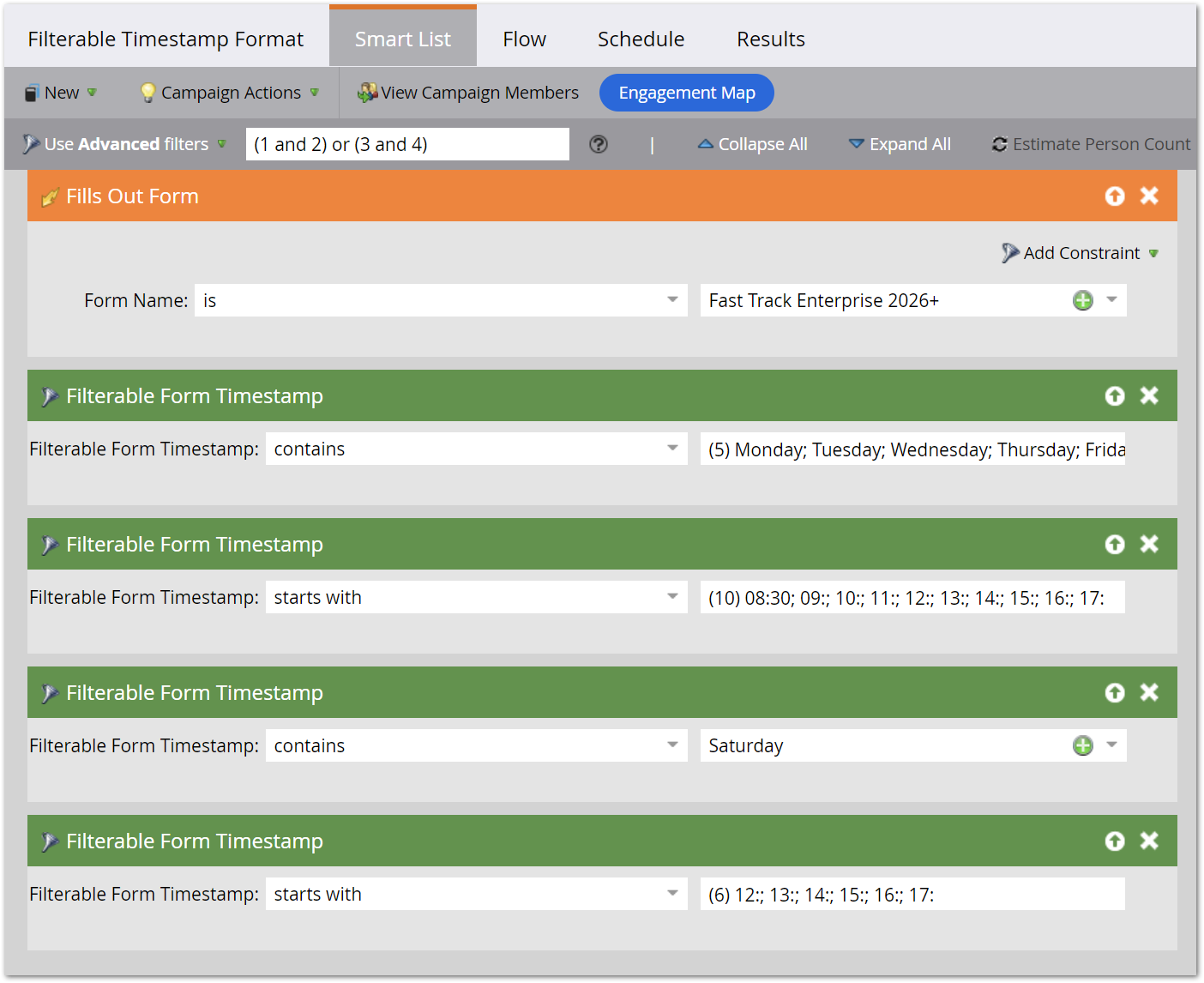
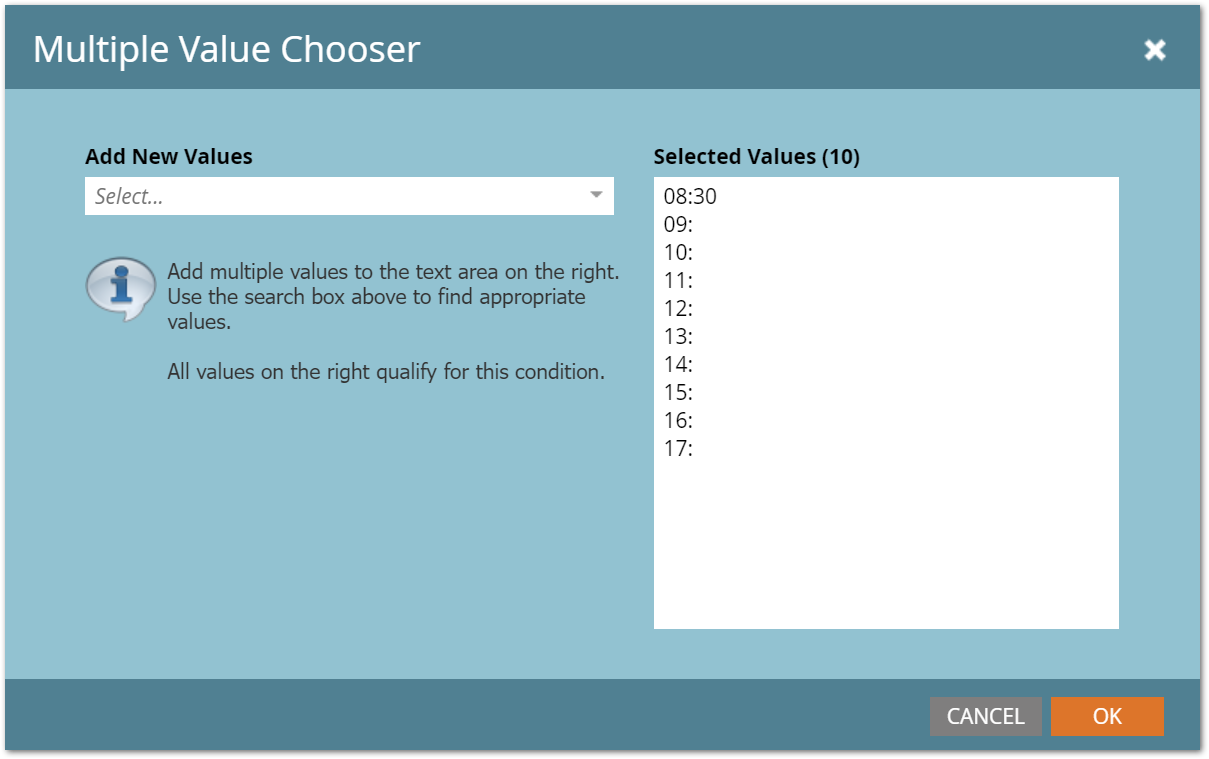
Closeup of the multiple values dialog for filter #2:
Pretty cool, right?
Why not do full “Is it business hours?” calculation in JS?
Sure, you could calculate in the browser and store a hidden Boolean like Was Last Form Fill During Business Hours. But that means any change to business hours requires a change to the JS config. More manageable to keep JS data-only while business logic lives in Marketo.
Why parse to URLSearchParams instead of a Map or regular Object?
Trade secret.😛 (Will explain in a future post. Guesses welcome in the comments!)
Notes
[1] You’ll see old community posts which purport to solve the problem using Advanced Wait, but they don’t actually work! Namely, they don’t fulfill the hour-of-day requirement.
[2] Filterable Form Timestamp is meant to be machine-readable (that is, Smart List-readable), not something you’d include in an alert. For alerts, store the full UTC submission time in a DateTime field:
MktoForms2.whenReady(function(readyForm){
  readyForm.onSubmit(function(submittingForm){
    submittingForm.addHiddenFields({
      lastFormSubmissionTS: new Date().toISOString()
    });
  });
});
Then you can format that however you want with a Velocity {{my.token}}.
[3] To match 8:30am-8:59am with a minIncrement = 1, you need [starts with] 08:3; 08:4; 08:5. In contrast, with minIncrement = 30 you just need [starts with] 08:30.