Sending to a one-off list without adding those email addresses to Marketo
The question comes up periodically: “Can we just send to the emails in this spreadsheet without adding them to the db?” The standard answer — and still the one you should give in an interview or certification context! — is No. But for certain definitions of “send” and “adding,” the creative answer is Yes.
Ripping an example from the headlines: one of our clients is acquiring another company, but that isn’t public yet. However, they have a list of a few thousand VIPs (email addresses only) they’re allowed to contact in advance and they want to use Marketo + their master template to announce the acquisition.
The contacts can’t show up in their CRM and can’t be searchable by email in Marketo. They can’t receive any other emails: ongoing nurtures must not send to them by accident, for example. And if any of the emails happen to be in Marketo already, they must not be merged for this one-off activity.
Here’s how to accomplish this if you feel like saying Yes. (Which can help your internal reputation.)
Step 1: Create a new Email type field
You could use an existing secondary Email field, but for maximum safety create a new field for this project. I called mine Pre-Acquisition Pending Email. It’s not synced w/CRM.
Step 2: Before importing, deliberately make the Email field unique + invalid
First, rename the original Email column to Pre-Acquisition Pending Email.
Then create a new Email column with unique random addresses @email.invalid, like UUID v7s:
01a215c0-70ca-7625-9411-c790b9b52bb0@email.invalid
01a215c0-70ca-7d90-a5d9-52e7d14de99e@email.invalid
01a215c0-70ca-7584-8107-3dcf20f90eca@email.invalid
Now import to a static list, presumably inside a program you’ve dedicated to this task.
(As noted in other posts, .invalid, like .example, isn’t a random TLD. It’s a standard TLD that’s reserved per RFC 2606. So you’re not just hoping nobody registers the domain in the real world, it’s guaranteed invalid.)
Step 3: Create a requestable campaign
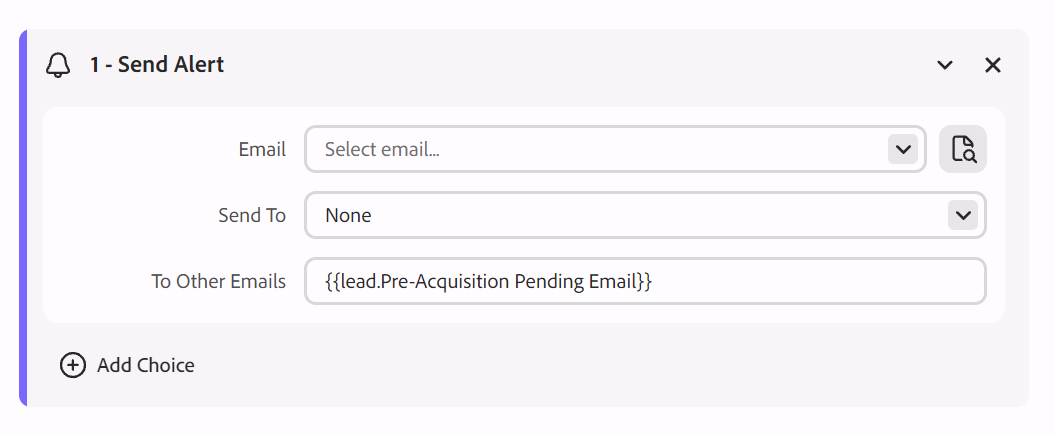
Here’s where the actual magic happens. Create a Smart Campaign with trigger Campaign is Requested. Add a Send Alert flow step with the desired email asset and Send To=None, To Other Emails={{lead.Pre-Acquisition Pending Email}}:
Step 4: Request the campaign via a batch
To send, schedule a batch campaign with:
- filter Member of List (or Member of Program if you chose to add to the program, that’s fine too)
- flow Request Campaign, calling the campaign from Step 3
Step 5: Delete everyone in the list
Once everyone has a Send Alert in their activity log, delete the randomized records.
Bonus: Re-add tracking via mkt_tok
Send Alert implicitly turns off tracking of all kinds, including email clicks, email opens, and subsequent web tracking. I see this as a positive, since the brief is typically “use Marketo’s templates and reliable delivery engine” as opposed to “embed this list completely into the Marketo ecosystem.”
But if you’re sure you want tracking, add the query param mkt_tok=##MKT_TOK## to your links and Munchkin will track web activities as usual. But be careful: this breaks the contract that you won’t update any people already in Marketo. If you reassign an existing Munchkin cookie, that’s an update!
I recommend you only log the single page they land on, which you can do with a custom Munchkin config that doesn’t set/get a cookie, then switch back to the original cookie.
So this is still a Kind-Of-Yes; is there a true Yes?
There’s a way to do this that takes only one new person in your Marketo database. But it comes at the cost of Marketo API calls, one for every person in the list. I’ll leave that approach as an exercise for the reader, though if you leave a comment I’ll confirm if you’re wrong or right! 😄